Introducing git-gud: A Stacked Diffs CLI for GitHub and GitLab

What are Stacked Diffs?
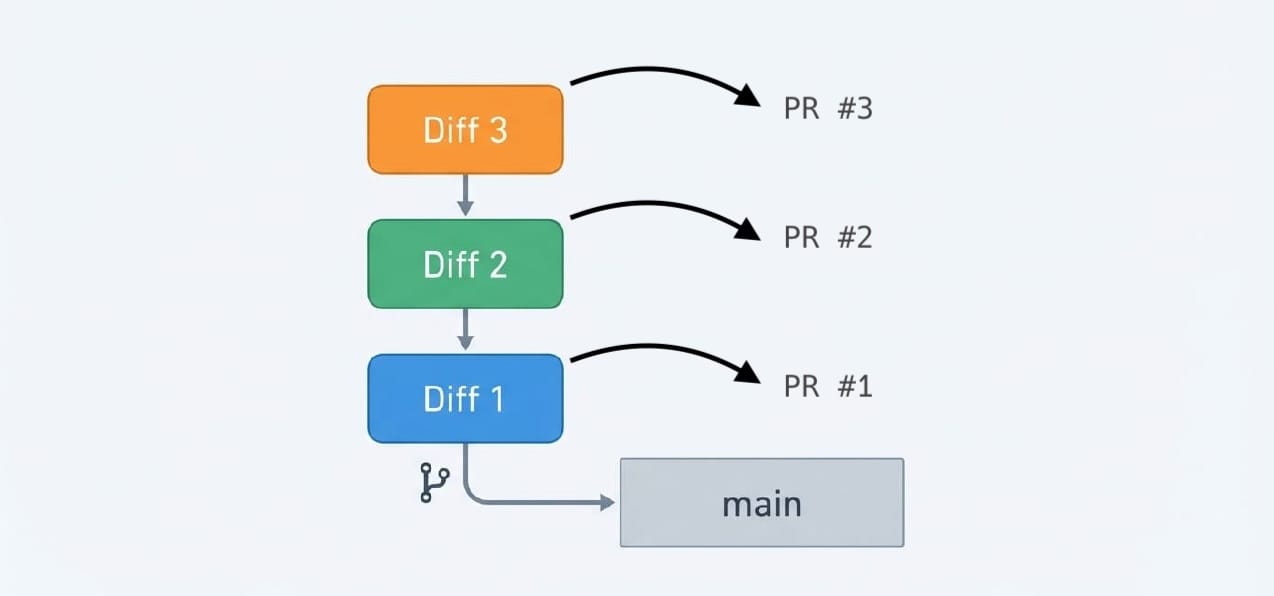
Stacked diffs (also known as stacked PRs or stacked changes) is a workflow where you break down a large feature into multiple small, dependent commits. Each commit becomes its own Pull Request, and they form a chain — Diff 2 depends on Diff 1, Diff 3 depends on Diff 2, and so on.
This approach has been used at companies like Meta (via Phabricator), Google (via Gerrit) and Twitter (via Gerrit and Phabricator) for years. The core idea is simple: instead of waiting for your first PR to be approved before starting the next one, you just keep working. The PRs can be reviewed in parallel, and they get merged in order once approved.
The Benefits
- Faster reviews — Small, focused changes are easier to review than 1000-line monsters
- Stay unblocked — Keep coding while waiting for reviews
- Clean history — Each commit is a logical unit of change
- Easier rollbacks — If something breaks, you know exactly which change caused it
Why I Built git-gud
There are already some great tools for stacked diffs out there:
- Graphite — Excellent GitHub integration, but GitHub-only
- git-stack, git-ps-rs, git-stack-cli — Great options, different workflows
- Gerrit — The OG, but requires its own server
My problem? I use both GitHub and GitLab daily. GitHub for open source projects, GitLab at work. I wanted one tool that works seamlessly with both, leveraging the official CLIs (gh and glab) I already use, but fall short.
So I built git-gud (or just gg) — a Rust CLI that brings stacked diffs to both platforms. And it does so in the way that I like.
 mrmans0n
A Real-World Example
Let's say I'm adding user authentication to an app. Instead of one giant PR, I break it down:
# Create a new stack
$ gg co user-auth
OK Created stack "user-auth" based on main

# Work incrementally, committing as you go
$ git add . && git commit -m "Add user model"
$ git add . && git commit -m "Add auth endpoints"
$ git add . && git commit -m "Add login UI"
Check the stack status:
$ gg ls
user-auth (3 commits, 0 synced)
  [1] abc1234 Add user model      (not pushed)
  [2] def5678 Add auth endpoints  (not pushed)
  [3] ghi9012 Add login UI        (not pushed) <- HEAD
Push everything and create PRs with one command:
$ gg sync --draft
OK Pushed nacho/user-auth--c-f9a1e2b -> PR #101 (draft)
   <https://github.com/user/repo/pull/101>
OK Pushed nacho/user-auth--c-7c1b9d0 -> PR #102 (draft)
   <https://github.com/user/repo/pull/102>
OK Pushed nacho/user-auth--c-98ab321 -> PR #103 (draft)
   <https://github.com/user/repo/pull/103>
The magic here: each PR targets the previous one in the stack, not main directly. PR #102 targets the branch for PR #101. This way, reviewers see only the diff for that specific change, not the accumulated changes from previous commits.
Handling Review Feedback
What happens when a reviewer asks for changes on commit 1? You navigate to it, make changes, and squash them in:
# Move to the first commit
$ gg mv 1
OK Moved to: [1] abc1234 Add user model

# Make your changes...
$ nvim src/user.rs

# Amend the changes into the current commit
$ gg amend
OK Squashed into abc1234
OK Rebased 2 commits on top

# Push the updated stack
$ gg sync
git-gud handles the rebasing automatically. Commits 2 and 3 are rebased on top of the updated commit 1, and all three PRs get updated by gg sync.
Landing the Stack
Once PRs are approved, land them:
# Land all approved PRs in sequence
$ gg land --all
OK Merged PR #101 into main
OK Merged PR #102 into main
OK Merged PR #103 into main

# Clean up
$ gg clean
OK Deleted stack "user-auth" (all merged)
You can also use gg land --wait to wait for CI to pass before merging — super useful for those "merge when green" scenarios.
Key Features
- GitHub + GitLab support — Uses
ghandglabunder the hood, auto-detects from remote URL - Stack navigation —
gg first,gg next,gg prev,gg last,gg mv <n> - Interactive reordering —
gg reorderopens your editor to shuffle commits - Absorb changes —
gg absorbauto-distributes staged changes to the right commits (Uses git-absorb internally). - Draft propagation — Commits starting with "WIP:" or "Draft:" automatically create draft PRs
- Remote stack checkout — Continue working on a stack from another machine with
gg co <stack>
Video Demo
Getting Started
Install via cargo:
cargo install gg-stack
Install via homebrew:
brew install mrmans0n/tap/gg-stackMake sure you have gh (for GitHub) or glab (for GitLab) installed and authenticated.
Check out the full documentation on GitHub:
 mrmans0n
Further Reading
If you want to dive deeper into stacked diffs as a concept:
- Stacked Diffs (and why you should know about them) — The Pragmatic Engineer
- Stacked Diffs Guide — Graphite
Give it a try and let me know what you think! 😄